
Create a Tier Scheme
Tier Schemes are used to incentivize Members to spend in your loyalty program by offering better rewards or increased discounts at higher tiers.
Your Loyalty account can optionally have more than one Tier Scheme. For example, you could define separate Tier Schemes for each brand in a multi-brand account. Or you could use a separate Tier Scheme for "hidden" tiers that aren't exposed to your Members.
To create a Tier Scheme:
-
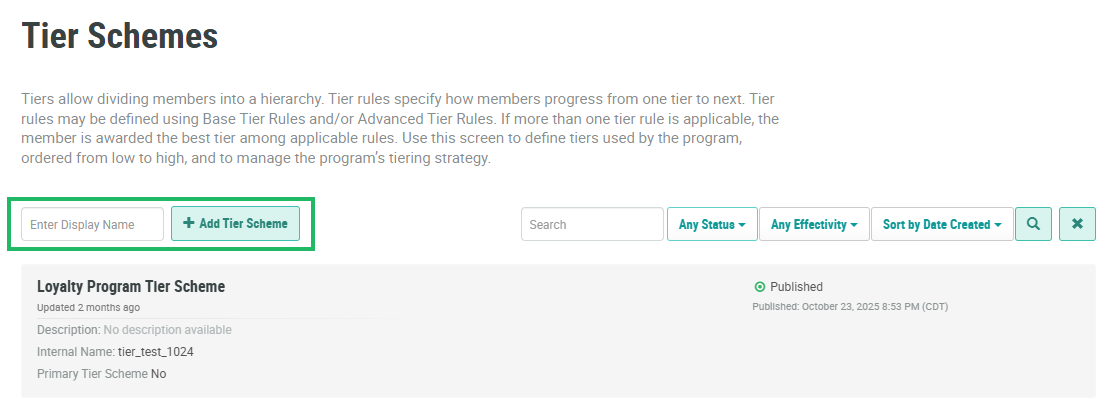
Select Rules from the top navigation bar, then select Tier Schemes from the side navigation menu. The Tier Schemes screen is displayed.
-
In the Display Name field, enter the name of the new Tier Scheme.
-
Click Add Tier Scheme. The Edit Tier Scheme pop-up window is displayed.
-
The Display Name field is populated with the value you entered above; optionally edit this value.
-
The Internal Name is automatically populated based on the Display Name value. This field is not editable by default. To edit the Internal Name, check Edit Internal Name. A confirmation dialog box is displayed; click Ok. Edit the Internal Name value.
-
Optionally, in the Description field, enter a description of this item.
-
Click Save.
-
Within the list on the Tier Schemes screen, click the new Tier Scheme to navigate to the Tier Scheme Details screen.
For additional information on how to configure the new Tier Scheme, see the following help center articles:
